PRNewswire
Taipei [Taiwan], November 16: CAYIN Technology, a professional digital signage solutions provider since 2004, today outlined how its SMP media players protect public screens from unauthorized access. The update follows a series of 2026 incidents in which hijacked screens displayed unauthorized content, from LED billboards in Giza, Egypt and Kluang, Malaysia on October 29 to a roadside traffic sign in Toronto in September.
The pattern is consistent: once a screen is connected to a network, the media player behind it becomes part of an organization's attack surface, and a single breach is visible to everyone who walks or drives past.
Why Are Digital Signage Networks Being Hacked?
Most signage hijacks exploit operational gaps rather than the screen itself. Four entry points appear again and again:
- Default credentials: players still using factory passwords, or one password shared across a whole network.
- Unpatched software: devices that miss security updates for months or years.
- Phished accounts: administrator logins stolen by email, then used to publish content remotely.
- Exposed services: players placed directly on the internet with unnecessary ports open.
Industry bodies such as AVIXA and the OAAA advise operators to replace factory credentials, segment networks and keep every device updated.
What Is at Stake When a Screen Is Hijacked?
A compromised screen damages brand trust in seconds, and images of it spread on social media long after the content is removed. For transport and public information displays, false messages can create safety risks. Many operators also lose revenue when they are forced to switch off entire networks while they investigate.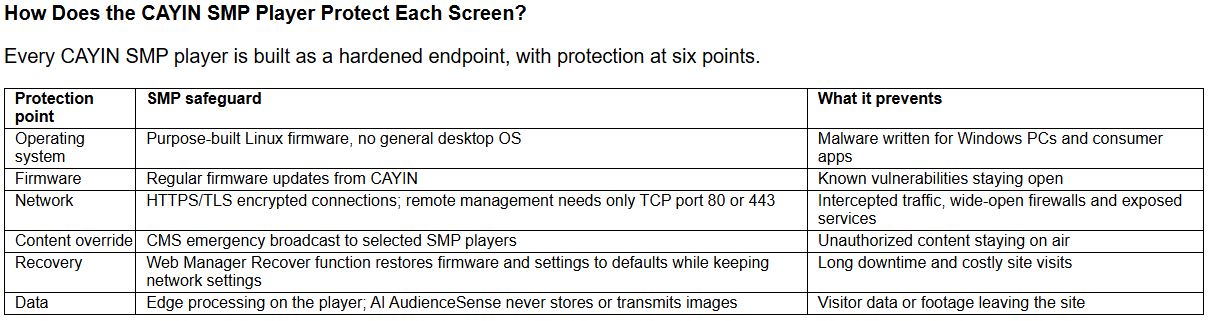
Why Does a Purpose-Built Linux Player Matter?
General-purpose PCs and consumer media sticks run operating systems designed for browsing, email and apps, which brings a broad attack surface to every screen. CAYIN SMP players run firmware built for one job: reliable 24/7 signage playback. Fewer running services mean fewer doors for attackers. Because CAYIN develops the SMP hardware, firmware and SMP-NEO playback software together, security fixes reach players through a single firmware update.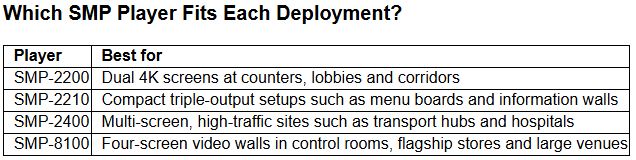
All four models share the same Linux-based SMP platform, so integrators apply one security approach across an entire network.
Security Checklist for SMP Deployments
- Replace the default password on every SMP player before it goes live.
- Place SMP players on a dedicated network segment and, for remote management, open only TCP port 80 (HTTP) or 443 (HTTPS).
- Enable HTTPS/TLS encrypted connections on every player.
- Keep SMP firmware on the latest release.
- Use CAYIN Device Seeker to list every SMP player on the network and confirm none are unaccounted for.
- Manage the SMP administrator account carefully, set a strong password, and restrict it to authorized personnel.
- Use the CMS emergency broadcast and rehearse the emergency message process regularly so playback can be switched quickly when needed.
- Mount SMP players in secure enclosures where screens face the public.
What Should an Operator Do If a Screen Is Hijacked?
1. Contain: use the CMS emergency broadcast to override content on the affected SMP players.
2. Lock down: reset the compromised account and change player passwords.
3. Restore: update the SMP firmware; if needed, use the Recover function in SMP Web Manager to return the player to clean defaults while keeping its network settings, then republish approved content.
4. Review: contact CAYIN support or a local partner to review logs and close the entry point.
Security holds only when every party plays its part. CAYIN designs SMP players and its support services so integrators and operators can carry out their share without extra tools.
How Does the CAYIN Team Support Integrators on Security?
CAYIN's engineering and technical support teams work directly with system integrators from deployment to incident response. Support covers a hardening review at installation, SMP firmware update guidance, and remote troubleshooting through the Online Help Center (https://www.cayintech.com/support/FAQ.html) and regional partners.
Availability
The security capabilities described apply to CAYIN SMP-2200, SMP-2210, SMP-2400 and SMP-8100 players. With global chip supply tight, we recommend contacting the CAYIN sales team early to reserve units and avoid long lead times.
Contact CAYIN or a local partner: https://www.cayintech.com/about/contactus.html
FAQ
Are CAYIN SMP players based on Windows?
No. They run purpose-built Linux firmware designed for 24/7 signage playback.
Are CAYIN SMP player connections encrypted?
Yes. SMP players support HTTPS/TLS encrypted connections.
Does CAYIN provide firmware updates for security?
Yes. CAYIN releases firmware updates for SMP players to close newly found vulnerabilities.
Which firewall ports does CAYIN SMP remote management need?
Only TCP port 80 (HTTP) or TCP port 443 (HTTPS).
Can a hijacked CAYIN screen be taken back quickly?
Yes. The CMS emergency broadcast overrides scheduled content on selected SMP players.
Can an SMP player be restored without a site visit?
Yes. The Recover function in SMP Web Manager resets firmware and settings to defaults from a browser while keeping network settings.
Which CAYIN players include these protections?
SMP-2200, SMP-2210, SMP-2400 and SMP-8100.
About CAYIN Technology
CAYIN Technology is a professional digital signage solution and software developer from Taiwan with more than 20 years of experience. By offering a complete portfolio of appliance-based digital signage solutions, CAYIN dedicates itself to being a reliable partner to clients worldwide and has successfully set up various applications globally. In order to best facilitate the deployment of its products, the company also provides tailored services to satisfy the ever-growing market demand for almost limitless applications.
(ADVERTORIAL DISCLAIMER: The above press release has been provided by PRNewswire. ANI will not be responsible in any way for the content of the same.)